My Mac's menu bar has become a small control panel: check which services are running, open a dashboard, run a job, or inspect a log. It saves me from remembering commands and finding the right terminal.
I built the menu with SwiftBar. A script prints labels and actions, and SwiftBar turns the output into a native menu. The setup worked well, but I wanted the menu host to use less memory.
So I built LeanBar, a small Swift and AppKit utility from PVR Labs. I kept my existing scripts. In one local comparison, the native host's physical footprint was 12 MB versus 59 MB for SwiftBar.
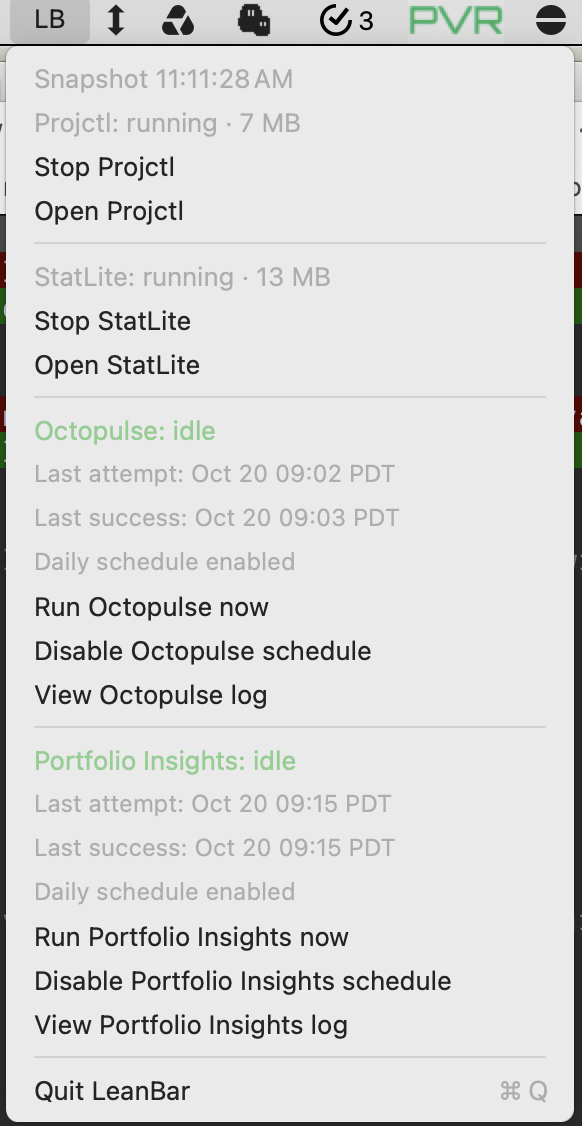
Keep the scripts, reduce memory use
The useful logic was already in my scripts: how to check a service, start it, or launch a scheduled job. The host only needed to read their output, build a menu, and dispatch the selected action.
That boundary made the experiment manageable. I could replace the presentation layer without rebuilding the management tools.
I implemented the subset of SwiftBar's output format my menu used: flat labels, separators, colors, font sizes, and commands with numbered arguments. My existing menu script worked unchanged.
The limited format is a tradeoff. A plugin that needs submenus, images, cycling headers, or terminal actions will need a different host or changes to its output. Supporting my menu gave the project a concrete scope.
A native menu with a small job
LeanBar is written in Swift with AppKit. It uses an NSStatusItem and an NSMenu. One configured command produces one menu, and a plain LB label sits in the menu bar.
A menu can be much simpler than my portfolio controls. The example bundled with LeanBar shows battery status, free disk space, and a few everyday actions:
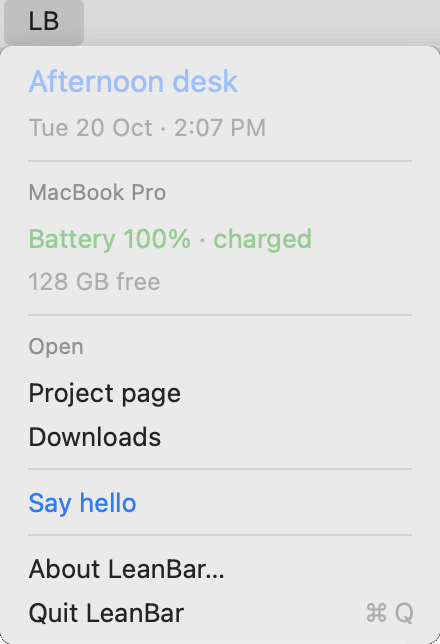
The host has no marketplace, settings interface, or animation. Keeping the feature set small also limits how much code I have to maintain.
The tricky part was clicking the right command
A small menu can still trigger real operational actions. Refreshing its contents while someone is using it deserves care.
Review caught a bug where a refresh could change which command a displayed item resolved to. Imagine opening a menu, seeing “Restart service A”, and having a refreshed command list change what that click would execute. Each item now retains the executable and arguments of the action it displayed.
Another bug could silently drop a click while a refresh was running. Explicit actions now queue behind active work. Submitting the same command again is blocked while it is queued or running, including through a rebuilt menu item.
Commands run off the UI thread, one invocation at a time. Arguments stay separate values instead of being joined into a shell command. A short-lived Python helper handles output limits, timeouts, and process cleanup. These are trusted local scripts running with my user permissions.
Opening the menu requests fresh status; closing and reopening shows the refreshed snapshot. Background refreshes stay quiet. Queued or running actions show progress, and failures remain visible.
What the memory comparison showed
In one recorded local comparison, the native host's physical footprint was 12 MB after opening the menu, compared with 59 MB for SwiftBar, about an 80% reduction in that observation.
Those figures come from my setup, not guaranteed memory limits. The scripts also have their own temporary cost when they run, and the packaged app has not been benchmarked as a separate build. The prototype was comfortably below the 20 MiB budget I wanted for this utility.
A small utility to own
LeanBar has now replaced SwiftBar on my Mac. It runs at login through a LaunchAgent, and I have uninstalled SwiftBar. Checks cover command arguments, failures, timeouts, repeated menu opening, and overlap between refreshes and actions. I am still evaluating longer-term reliability in daily use.
The useful design decision was keeping the management logic in scripts. That made the host replaceable. A narrow format and native menu were enough for my control panel, with a memory footprint I was happier to leave running.