A dashboard is useful when you are investigating a problem. For the rest of the day, a message on your phone can tell you when an application needs attention and when it recovers.
I develop StatLite, a small self-hosted metrics dashboard from PVR Labs. Its external API already exposes application health. A scheduled shell script can use that information to send Telegram notifications.
What arrives in the chat
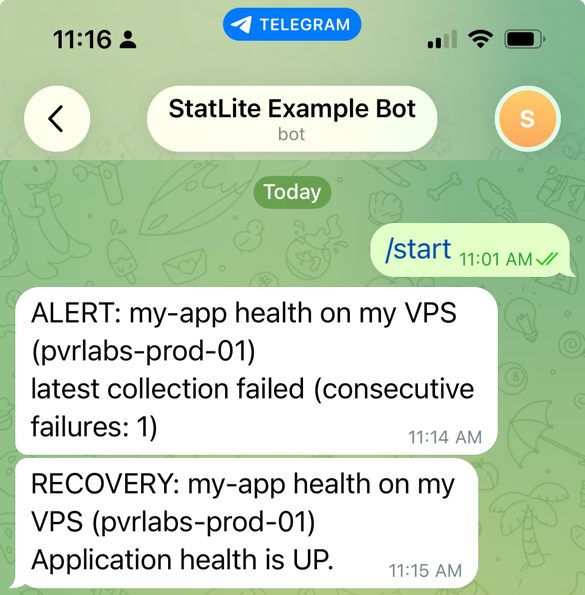
The screenshot shows messages from a real test using StatLite and Telegram. The alert reports a collection failure; the recovery reports application health UP. Each message identifies the application and server and includes a short reason.
A small extension to an existing setup
StatLite status API → shell script → TelegramThe script checks periodically, sends an alert when collection fails or the application reports an unhealthy status, and sends a recovery when things return to normal. It avoids repeated notifications while the same condition continues.
For an existing StatLite deployment, this adds a check script, a Telegram wrapper, and a small local state file. There is no additional monitoring stack, database, or dedicated alerting service to run. Telegram delivery is external automation around the API, configured separately from StatLite.
I tested personal-chat delivery and the documented systemd timer in a Linux VM. The screenshot captures the resulting messages, with an illustrative server label.
Try it on your VPS
Start with a StatLite target whose integration reports application health. Create your own Telegram bot, configure the destination chat and server label, and run the recipe's launcher manually. Once that works, schedule it with cron or the supplied systemd timer.
For example, the launcher can run every minute from the scheduling user's crontab:
PATH=/usr/local/bin:/usr/bin:/bin
* * * * * /home/statlite-alerts/check-health
This is not independent uptime monitoring. If the host running StatLite and the script goes offline, it cannot send notifications. Use an independent uptime check when you need to detect that failure.
Follow the complete Telegram recipe for bot setup, protected credentials, the launcher, and scheduling. It also covers missing health data, retries, and troubleshooting.